Start With the Use Case, Not the Artwork
A canvas grocery tote for a tech startup usually has two jobs: carry real weight and make the brand visible in a normal carrying position. If the tote is used for conference swag, the logo must read from a few meters away while the bag hangs from a shoulder or hand. If it is used in a retail pilot or employee welcome kit, the bag also needs to look neat when folded, stacked, and photographed by the recipient.
The most common buying mistake is sending a logo file and asking the factory to place it on the front. That leaves too much interpretation to the sample room. A better RFQ defines the bag format first, then the logo safe zone. For a grocery tote, the gusset, handle drop, top hem, and bottom fold all change the usable branding area.
- For grocery use, define the load target, such as laptop plus groceries, event merchandise, or retail purchase packaging.
- For shoulder carry, keep the logo below the hand and handle connection area so it is not hidden by the arm.
- For retail stacking, confirm whether the logo remains visible after folding or if a side label is more practical.
- For distributor resale, keep one neutral logo placement that can support multiple end buyers without changing the sewing pattern.
Choose a Logo Safe Zone Before Sampling
Logo placement on canvas grocery totes should be measured from sewn reference points, not only from flat cutting panels. A typical front-center placement starts about 70-90 mm below the top opening and stays at least 40-50 mm away from side seams and the bottom fold. This keeps the print clear of the handle reinforcement and prevents distortion when the bag is loaded.
For a common 380 x 420 x 120 mm tote, a horizontal startup logo often works best at 180-230 mm wide. A vertical or stacked logo usually works at 120-160 mm tall. These sizes are large enough for visibility but still leave breathing room around the mark. If the brand has a very thin wordmark, the factory should test whether the smallest strokes fill cleanly on the chosen canvas texture.
- Reference point: measure logo distance from the finished top edge after hemming.
- Centering: align to the visible front panel, not the full fabric panel before side gusset folding.
- Safe margin: avoid the handle bartack zone, especially on bags with long shoulder handles.
- Bottom risk: avoid the fold line if bags are packed folded for courier shipment or fulfillment.
Match Fabric Weight to Print Quality
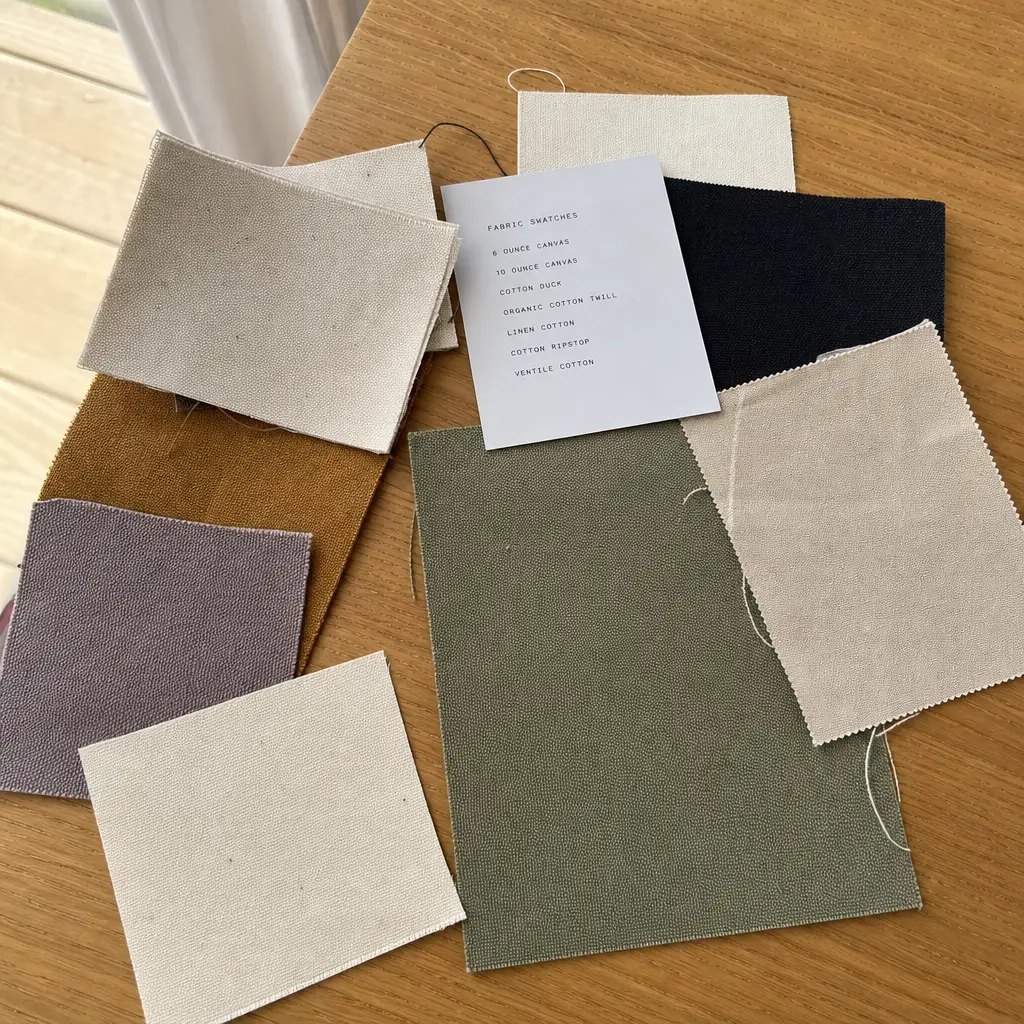
Canvas weight affects both the hand feel and the printed result. A 6 oz or 8 oz canvas can be attractive for low-cost giveaways, but it may not support a grocery tote shape well and can make a centered logo sag when the bag is filled. For a practical startup grocery tote, 10 oz to 12 oz canvas, roughly 280-340 GSM depending on yarn and weave, is usually the better commercial range.
Heavier canvas such as 14 oz gives a premium structure, but buyers should calculate the extra freight, carton weight, and sewing difficulty. Heavy fabric can require stronger needles, slower sewing, and more pressure during printing. If the quote is far cheaper than other suppliers at the same stated GSM, request a weighed fabric swatch and final bag weight because some suppliers quote nominal canvas weight without confirming actual finished material.
- 8 oz canvas: suitable for lightweight promotion, less ideal for loaded grocery use.
- 10 oz canvas: good balance for event giveaways and standard reusable shopping bags.
- 12 oz canvas: stronger hand feel for startup welcome kits, retail use, and repeated carrying.
- 14 oz canvas: premium but increases unit cost, freight cost, and folding bulk.
Select the Print Method Around the Logo
For most tech startup logos with one to three solid colors, screen printing is the safest production method on canvas grocery totes. It gives predictable color, good durability, and manageable cost once the order reaches an efficient MOQ. The RFQ should state Pantone references, print size, number of colors, and whether the buyer wants a soft-hand water-based print or a stronger opaque print.
Heat transfer or digital transfer can be useful for gradients, photographic artwork, or small pilot orders, but they change the risk profile. Transfers can feel heavier, show a visible film edge, or crease if folded across the print. Embroidery is rarely the first choice for a large grocery tote front logo because stitch count drives cost and heavy embroidery can pucker canvas unless backed correctly.
- Use screen print for solid startup wordmarks, icons, and simple campaign slogans.
- Use transfer print only when full-color artwork is unavoidable or MOQ is too low for efficient screens.
- Avoid oversized embroidery on thin canvas unless the factory proves the backing and tension in a sample.
- Specify ink adhesion and rub tests because visual approval alone does not prove durability.
Understand MOQ Logic and Cost Drivers
MOQ is not only a factory policy. It comes from fabric purchasing, cutting efficiency, print setup, sewing line changeover, and packing labor. A first order with one natural canvas color, one screen print color, and one logo placement is much easier to quote than an order split across three fabric colors, two logo sizes, and custom labels for each department.
For startup buyers, the best commercial approach is often to approve one core tote specification first, then add variants in a reorder. If the launch requires multiple departments or sponsor logos, use the same bag body and change only the print screen when possible. That keeps cutting, sewing, and packing stable while giving the marketing team controlled variation.
- Lower cost structure: one fabric color, one handle type, one print position, one packing method.
- Higher setup cost: multiple print colors, mixed logo placements, special labels, and individual retail packaging.
- MOQ pressure point: dyed canvas usually requires higher MOQ than natural or stock black canvas.
- Quote clarity: separate bag cost, print setup, label cost, sample cost, packing upgrade, and freight estimate.
Compare Logo Placement Options by Buyer Risk
A front-center logo is the safest default, but it is not automatically the best option for every program. A large front logo gives strong visibility at events, while a smaller lower-corner mark can feel more retail and less promotional. A side label is useful when the buyer wants subtle branding or expects the tote to be reused in public without feeling like an advertisement.
The placement decision should also consider production order. Printing before sewing is efficient and gives a flat print surface, but the final position depends on sewing tolerance. Printing after sewing can improve visual alignment on the finished bag, but it is slower and limited by seams, gussets, and print board access. The factory should state which method it will use before the sample is made.
- Front center: best visibility, easiest approval, and lowest misunderstanding risk.
- Lower corner: more subtle look but requires tighter alignment control to avoid looking accidental.
- Back panel: useful for campaign text, QR codes, or secondary messaging, but adds print setup.
- Side label: premium and durable, but needs label MOQ and sewing placement control.
Approve Samples With Real Acceptance Criteria
A pre-production sample should prove more than the logo size. It should show the final fabric weight, final stitching method, handle length, gusset depth, print color, print texture, folding method, and carton or inner packing style. If the sample uses substitute fabric or a temporary print method, it is only a shape reference and should not be treated as production approval.
When reviewing the sample, load it with realistic contents. A grocery tote that looks balanced while empty may stretch and hide the logo under the handle area when filled. Photograph the sample flat, hanging by hand, hanging from a shoulder, and folded for packing. These photos become useful approval references for both the buyer and factory QC team.
- Measure logo width, height, top distance, side distance, and visual center after sewing.
- Review ink edge sharpness, pinholes, color match, hand feel, and rub resistance.
- Load the tote to the expected use weight and inspect handle stress points.
- Approve the folded or flat packing format before bulk packing starts.
Set QC Thresholds Before Bulk Production
Canvas grocery totes are simple products, but they still need measurable inspection standards. For logo placement, agree on a realistic tolerance before mass production. A common buyer-friendly approach is to allow small variation in millimeters while rejecting obvious off-center prints, tilted logos, double images, or logos touching seam and handle zones.
Stitching and fabric defects matter because they affect brand perception. Loose threads, stains, uneven hems, skipped stitches, and weak bartacks are not minor if the tote is used by employees, investors, or retail shoppers. The inspection plan should include a random sample from finished cartons, not only pieces selected from the sewing line.
- Print position: define tolerance from finished top edge and panel centerline.
- Print quality: reject blurred edges, visible smears, poor opacity, and trapped lint in the logo.
- Sewing: inspect handle bartacks, top hem, side seams, bottom corners, and gusset alignment.
- Function: run loaded-handle checks and basic seam pull checks on random finished pieces.
Plan Packing Around the Logo
Packing can damage an otherwise good print. Flat packing protects the logo better, but increases carton footprint. Folding reduces carton size and courier cost, but the fold line must not run through a thick ink area or transfer print. For startup launch kits, individual polybags may support clean fulfillment, while bulk bundles are more efficient for event teams that unpack everything onsite.
The RFQ should include packing style because it affects labor, material, carton size, and landed cost. A supplier quote without carton dimensions and gross weight is incomplete for importers and distributors. If the order will move by sea, the buyer should consider compression during transit. If it will move by air or courier, folded dimensions and chargeable weight can matter more than unit price.
- Flat pack: better presentation and lower crease risk, but larger cartons.
- Half-fold pack: lower volume, but must avoid folding across the logo.
- Individual polybag: cleaner for fulfillment, higher material and labor cost.
- Bulk bundle: efficient for events, but needs clear carton marks and piece counts.
Build a Quote Sheet That Suppliers Can Price Accurately
A strong RFQ gives the supplier enough data to price production instead of guessing. Include finished bag size, gusset, handle size, canvas weight, fabric color, logo artwork, print size, print colors, placement drawing, packing format, order quantity, delivery term, and target shipment date. This reduces quote gaps and makes supplier comparison more meaningful.
When comparing quotes, do not look only at unit price. A lower quote may exclude screen setup, sample cost, woven labels, individual packing, export carton upgrade, or inspection support. For importers, carton size and gross weight influence freight cost. For retail buyers, barcode labels, carton marks, and packing presentation can affect receiving efficiency and chargeback risk.
- Quote data: bag size, material GSM, handle construction, print method, color count, and placement diagram.
- Commercial data: MOQ, tier pricing, sample charge, tooling or screen charge, payment terms, and validity date.
- Logistics data: pieces per carton, carton size, gross weight, HS code guidance, and estimated production lead time.
- Approval data: sample timeline, pre-production sample requirement, inspection standard, and defect handling process.
Specification comparison for buyers
| Spec decision | Recommended option | When it fits | Buyer risk to check |
|---|---|---|---|
| Main logo position | Centered on front panel, 70-90 mm below bag opening and clear of handle stitching | Best for startup event giveaways, grocery retail bags, and onboarding kits where the logo must be visible when the tote is carried | If the print sits too high, handle bartacks can distort the artwork or make the logo look crowded after sewing |
| Print size for 380 x 420 x 120 mm grocery tote | 180-230 mm wide for horizontal logos, 120-160 mm tall for stacked logos | Works for most tech brand marks without making the tote look like a billboard | Oversized prints on coarse canvas may show pinholes, uneven ink coverage, or cracking on folds |
| Fabric weight | 10 oz or 12 oz canvas, roughly 280-340 GSM, with 14 oz only when a premium heavy bag is needed | Balances structure, print stability, freight weight, and unit cost for bulk startup programs | Low GSM canvas can sag and deform the logo; very heavy canvas raises shipping cost and can feel stiff |
| Print method | Spot-color screen print for solid startup logos; heat transfer only for complex gradients or low MOQs | Screen print gives durable, clean branding on canvas when Pantone color and ink hand-feel are controlled | Digital or transfer prints may look sharp in samples but fail abrasion or wash checks if the process is not specified |
| Side label or secondary logo | Small woven side label or inside care label, not a second large front print | Useful for co-branded campaigns, retail buyers, or distributor stock programs | Extra labels add cutting and sewing operations; wrong label placement can rub the hand or twist at the side seam |
| MOQ planning | Use one fabric color, one print color, and one placement for the first 500-1,000 pcs before splitting versions | Good for startups testing events, employee gifting, and pilot retail runs without locking cash in slow-moving variants | Too many logo locations or colorways below efficient MOQ cause higher setup charges and mixed-carton errors |
| Sample approval | Approve a physical pre-production sample with final logo size, handle sewing, gusset, packing fold, and carton mark | Necessary before mass production when logo position is part of brand approval | Flat artwork approval alone does not show fabric shrinkage, print edge quality, or how the logo sits after folding |
| Packing format | Flat pack 25-50 pcs per inner bundle or folded pack only after confirming crease line avoids the logo | Flat packing protects the print and presents better for retail or distributor receiving | Folding across wet-looking plastisol ink or thick transfer areas can leave pressure marks during sea freight |
Buyer checklist before sampling
- Define the actual bag size, gusset depth, handle length, and whether the tote must stand when loaded.
- Specify canvas weight in oz and GSM, not only the word canvas.
- Place the main logo inside a measured safe zone away from top hem, side seams, bottom fold, and handle stitching.
- Confirm print method, ink type, Pantone colors, artwork format, and acceptable color tolerance before sampling.
- Approve a physical sample after loading the tote with realistic contents, not only while it is empty and flat.
- State whether the bag will be folded, flat packed, individually polybagged, or bundled for warehouse handling.
- Request quote lines for setup charge, sample charge, logo plate or screen cost, carton dimensions, gross weight, and lead time.
- Set QC thresholds for print position tolerance, ink adhesion, stitching strength, loose threads, stains, and carton marking.
Factory quote questions to send
- What canvas weight do you recommend for this tote size, and can you quote both oz and GSM?
- What is the maximum clean screen print area on the front panel after sewing, including safe margins from seams and handle bartacks?
- Will the logo be printed before or after sewing, and how does that affect placement tolerance?
- What is your standard placement tolerance for screen printing on canvas grocery totes in mass production?
- Can you make a pre-production sample using final fabric, final logo size, final handle construction, and final packing method?
- What MOQ applies to one fabric color, one print color, one placement, and how does MOQ change for extra colorways or side labels?
- What tests will you run for ink adhesion, rub resistance, seam strength, and handle pull strength?
- What are the packed carton dimensions, pieces per carton, estimated gross weight, and recommended loading method?
- Which quote items are excluded, such as artwork redraw, Pantone matching, woven labels, individual polybags, or inspection support?
Quality-control points to confirm
- Logo centerline should remain visually centered on the sewn front panel, with common production tolerance agreed before bulk cutting.
- Print surface should show solid ink coverage without heavy pinholes, blurred edges, double images, or fabric lint trapped in ink.
- Logo should stay outside handle bartack areas, top hem folds, side seams, and the lower fold line used for packing.
- Screen print adhesion should pass tape pull and dry rub checks on the approved fabric weight.
- Handles should be bartacked or box-stitched consistently, with no broken stitches, skipped stitches, or loose threads at stress points.
- Bag dimensions should be measured after sewing, not only from cutting panels, because canvas shrinkage and seam allowance affect final size.
- Carton packing should avoid hard creases across the print and should match the approved carton mark and inner bundle count.
- Random inspection should include loaded-handle checks using realistic grocery or event-kit weight, not only empty visual inspection.